ECO Statistics
| D45 | 315 | 4 | 1 |
| D43 | 309 | 2 | 0 |
| C11 | 230 | 6 | 2 |
| D38 | 224 | 0 | 0 |
| A00 | 221 | 0 | 0 |
| B00 | 206 | 20 | 9 |
| C02 | 201 | 3 | 1 |
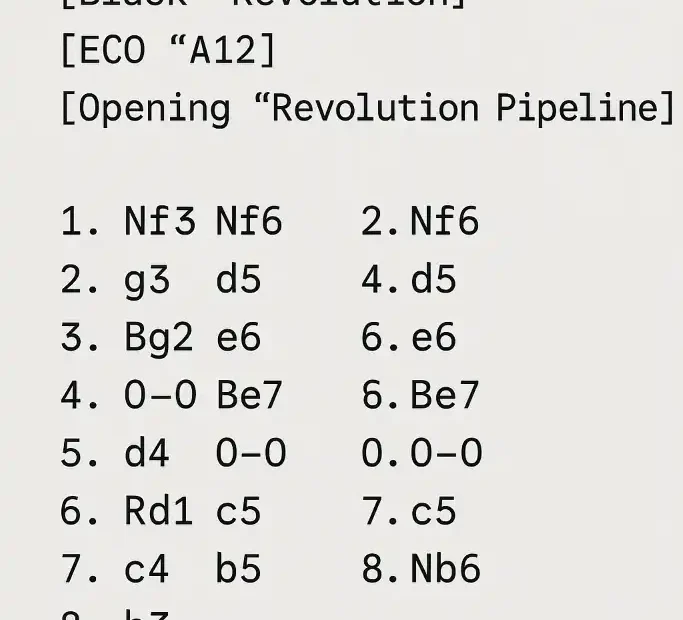
That’s it! I’ve uploaded your ECO Statistics.csv file , selected the 10 highest priority lines (based on “Total Games”), and generated a PGN LS01 suite with each line limited to 8 full moves (16 plies) whenever possible.
Downloads
Note: Your CSV doesn’t include the movement sequence (there’s no column of moves); therefore, where I couldn’t reconstruct the line, I’ve left aplaceholder commentinside the PGN so you can paste the SAN you want to train (if you prefer, I can autocomplete main ones using standard ECO in another iteration).
How to train Phase 1
Objective: Initialize the Revolution experience file with stable self-learning and no rival bias.
- Matchmaking: Revolution vs Revolution (same build/options).
- Openings: file
LS01_training_suite.pgn(10 lines). - Line limit: 8 full moves per game (already truncated in the PGN).
- Sessions: 10 total sessions for LS01.
In each session, run through all 10 lines (alternating colors), e.g., 4 games per line (2 with each color) → 40 games/session . Adjust if you want more samples. - ICU Options (suggested):
Experience Book = trueExperience Book Eval Importance = 2Experience Book Min Depth = 27Minimum Thinking Time = 10(ms) if you use very short TCs.- Hash according to your RAM/concurrency (e.g., with 16 GB total and 8 threads, Hash=512–1024 MB per instance is reasonable).
Example with cutechess-cli (Windows)
:: === LS01 - Sesión 1 (ejemplo) ===
set CUTE=C:\cutechess\cutechess-cli.exe
set REV=C:\engines\Revolution\revolution.exe
set PGN=C:\suites\LS01_training_suite.pgn
set OUT=C:\runs\LS01_s01.pgn

"%CUTE%" ^
 -engine cmd="%REV%" name="Revolution-A" option.Hash=1024 option."Experience Book"=true option."Experience Book Eval Importance"=2 option."Experience Book Min Depth"=27 ^
 -engine cmd="%REV%" name="Revolution-B" option.Hash=1024 option."Experience Book"=true option."Experience Book Eval Importance"=2 option."Experience Book Min Depth"=27 ^
 -openings file="%PGN%" order=seq format=pgn plies=0 ^
 -each proto=uci tc=60+1 timemargin=500 ponder=off ^
 -games 40 -repeat -draw movenumber=8 movecount=2 score=5 -resign movecount=3 score=800 ^
 -pgnout "%OUT%" -srand 1 -concurrency 1
Key Notes
-openings ... order=seqrespects the order of the PGN (10 lines).- If you want 4 games per line with double alternating colors, put
-games 40. plies=0because I’ve already truncated you to 8 complete plays in the PGN itself.- Increase
-concurrencyif you want to parallelize (adjust Hash and number of experience file writers if your build requires it).
Fase 2 (LS02)
- Base:
LS02_candidates.csv(next 10 ECO for “Total games” of the year). - Generate
LS02_training_suite.pgnwith those plays (I can prepare it if you pass me the SAN of each line or if it is okay for you to fill in the main ones by ECO). - Repeat the same pattern: 10 sessions; 40 games/session (or your preferred volume), alternating colors.
Why Revolution vs Revolution in LS01?
- In the initial phase of an experience file , it’s important to establish typical evaluations and transitions without rival-style noise . Self-play controls variables and accelerates convergence (especially at
Experience Book Min Depthhigh speeds). - Already in LS02/LS03 you can introduce strong opponents (e.g. Stockfish, Berserk, Obsidian) in TB-heavy positions or critical branches to polish decisions in specific endgames and midgames.
Practical recommendations
- Random seeds: changes
-srandper session (1..10) to avoid exact replicas. - Time control: start with
60+1or30+0.5. If you are going to bullet (10+0.1), go upMinimum Thinking Time. - Incremental review: After each session, inspect nodes, depth, and the experience file footprint to confirm that entries are being added (and that odd branches are not becoming oversaturated).
- Backups: Version the experience file by LS01_s01…s10 (to revert if any session introduces “unlearning”).
Downloads
- LS01 (relleno) → LS01_training_suite_filled.pgn
- LS02 (relleno) → LS02_training_suite_filled.pgn
- Script Windows (10 sesiones) → run_revolution_LS_sessions.bat
How to use .BAT
- Copy the two PGNs to a folder, for example
C:\suites\. - Edit
.batto fit:CUTE→ route to yourcutechess-cli.exeREV→ route to yourrevolution.exeSUITE=LS01(or change toLS02when you phase)PGN_DIR,OUT_DIR,HASH,TC,GAMES_PER_SESSION,CONCURRENCY, etc.
- Run the
.bat. It will createLS01_s01.pgn…LS01_s10.pgn(or LS02) inOUT_DIR.
PGNs are limited to8 full playsper line (approx. 16 plies), with Revolution vs Revolutionand ECO/Opening headers already ready for yourexperience filepipeline .
ready-to-run .bat that auto-distributes the total RAM budget across all engine instances when you use concurrency > 1 (two engines per game):
- Download: run_revolution_LS_sessions_auto_hash.bat
How it works
- You set
TOTAL_HASH_MBto the overall memory you want to dedicate to Hash across the whole run (e.g.16384for ~16 GB). - With
CONCURRENCY = N, cutechess runs2 × Nengine instances (two engines per game). - The script computes:
INSTANCES = 2 × CONCURRENCYHASH_PER_INSTANCE = floor(TOTAL_HASH_MB / INSTANCES)- Enforces a floor min 16 MB per instance.
What to edit
Open the .bat and adjust:
CUTE→ path tocutechess-cli.exeREV→ path torevolution.exeSUITE=LS01(switch toLS02when you move to the next phase)PGN_DIR→ folder containingLS01_training_suite_filled.pgn/LS02_training_suite_filled.pgnTOTAL_HASH_MBandCONCURRENCYto match your machine- Optionally tweak
TC,GAMES_PER_SESSION,EBEI,EBMD
It prints a summary before running (instances and computed hash per instance), then executes 10 sessions with different seeds and writes
LS01_s01.pgn … LS01_s10.pgn(or LS02) to your output folder.

Jorge Ruiz
connoisseur of both chess and anthropology, a combination that reflects his deep intellectual curiosity and passion for understanding both the art of strategic