CTG Opening Book
This tutorial walks you through, in detail, how to create a ChessBase CTG opening book from zero using Fritz 20 as your GUI. The goal is a reproducible workflow you can use for:
- training your engines in tournaments,
- preparing specialised repertoires (e.g. Sicilian only), or
- building human-style opening manuals for your own study.
Throughout the text I will refer to “Fritz 20”, but the menus are almost identical in Fritz 17–19, so most steps work across recent versions.
1. What exactly is a CTG opening book?
CTG is the proprietary ChessBase opening-book format (“ChessBase Opening Tree of Games”). A CTG book is not just a list of moves; it is a tree of positions with statistics and engine preferences attached to each move.(help.chessbase.com)
Technically, a ChessBase book consists of four files with the same base name:
MyBook.ctg– main binary book data (positions, moves, stats)MyBook.ctb– bitmap of used/free pagesMyBook.cto– lookup table for fast accessMyBook.ini– auxiliary text information (description, settings)(chessprogramming.org)
When you use an engine under Fritz 20 with a CTG book:
- Fritz looks up the current position in the book tree.
- It sees all candidate moves plus statistics: number of games, score, performance, and a “probability”/weight column.
- The engine is forced (or strongly encouraged) to play one of those book moves before it starts calculating.
From an engine-tester’s point of view, your CTG book defines the opening distribution of your tournaments.
2. Requirements and initial planning
2.1 Software and files you need
- Fritz 20 installed and activated.
- At least one database of games:
- ChessBase formats:
.cbh,.cbv,.2cbh, etc. - Or standard PGN databases, which Fritz can convert.
- ChessBase formats:
- Enough disk space: even modest books can reach hundreds of MB if you import huge databases.
2.2 Decide the purpose of your book
Before you touch Fritz, decide what kind of book you want:
- General-purpose engine book
- Wide opening coverage, deep main lines.
- Sources: strong engine vs engine games + top human games.
- Specialised repertoire book
- Focused on one opening family (e.g. Sicilian B20–B99, King’s Indian, etc.).
- Sources: filtered databases by ECO, or your personal repertoire.(Chess Stack Exchange)
- Human training book
- Narrow, curated, human-style lines with clear main recommendations.
- More manual tuning, fewer random sidelines.
Your design choices later (filters, ECO ranges, import length) will depend on this decision.
3. Preparing a clean game database
The quality of your CTG book is limited by the quality of its source games. Spend time here; it pays off later.
3.1 Collect a high-quality source
Typical sources:
- Mega Database / Big Database from ChessBase.
- PGN from official events, TWIC, or engine tournaments.
- Your own engine gauntlets (for highly tuned engine vs engine books).(help.chessbase.com)
If your games are scattered across many PGNs, first merge them into a single database in Fritz or ChessBase.
3.2 Open the database in Fritz 20
- Start Fritz 20.
- Press F12 to open the Database window (list of databases).(Chess.com)
- Use File → Open → Database… and select your PGN/CBH file.
- Double-click it to open the game list.
3.3 Filter and clean (recommended)
You do not have to do all of these, but they are standard book-builder hygiene:
- Remove junk games
- Filter out games shorter than, say, 10–15 moves.
- Exclude games with obvious blunders or forfeits (results like 1–0/0–1 in 5 moves).
- Restrict by rating
- For human books: only players above 2200–2400 Elo.
- For engine books: only strong engines, or only games from top tournaments.
- Filter by ECO
- For a specialised Sicilian book, filter ECO codes B20–B99, etc.(Chess Stack Exchange)
Save this filtered collection as a new database, e.g. Sicilian_Filtered.cbh. This will be the database you import into your CTG book.
4. Creating an empty CTG opening book in Fritz 20
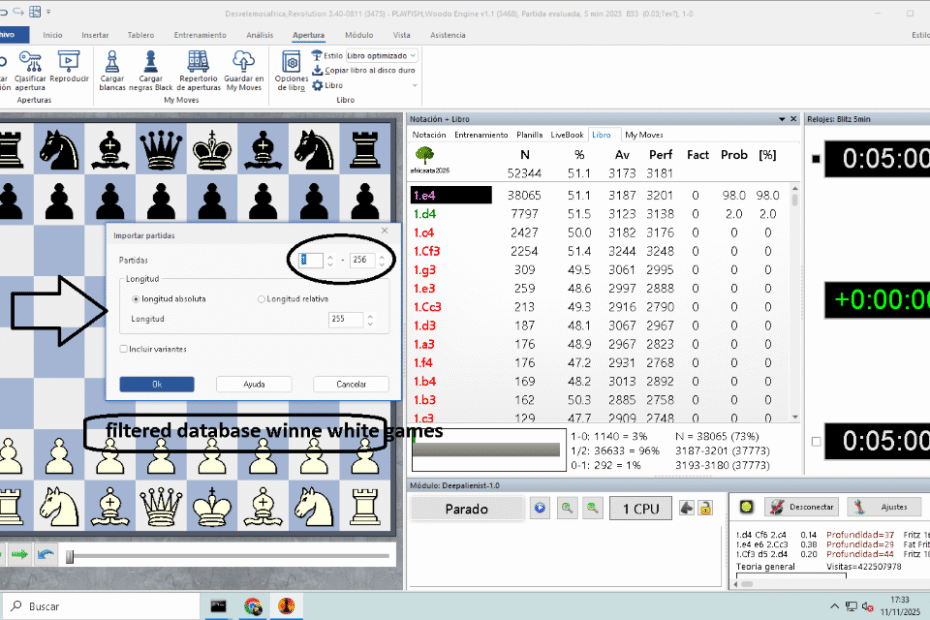
The screenshots at the top show some of these steps:
- Image 1/2: the File → New → Openings book command and the save dialogue.
4.1 Open the board window
- In Fritz 20, open a New Game (any position; the board must be visible).
- Make sure the Notation / Openings Book pane is visible on the right. If not, enable it via View → Notation.
4.2 Create the CTG book file
- In the main menu, choose
File → New → Openings Book… (in some layouts this is under the “Home” tab, small book icon).(talkchess.com) - In the dialog:
- Navigate to your preferred folder (by default Fritz suggests a
Booksfolder under your Documents). - In File name, type something descriptive, e.g.
Sicilian_Special.ctg.
- Navigate to your preferred folder (by default Fritz suggests a
- Click Save / New/Open.
You have now created an empty CTG tree. It appears in the Openings Book tab on the right, but contains no lines yet.
5. Importing games into the CTG book
Now we convert your clean database into a full opening tree.
5.1 Load your new book
If the CTG is not already active:
- Go to File → Open → Openings Book….
- Select
Sicilian_Special.ctgand click Open.(talkchess.com)
The book name appears at the top of the Openings Book tab.
5.2 Start the “Import Games” function
With the book loaded and a board window active:
- In Fritz 20, open the Openings Book tools:
- Either via the ribbon (Analysis → Openings book), or
- via Edit → Openings book → Import games… (older menu path).(talkchess.com)
- Click Import games. The “Import games” dialogue appears (see the “Import” screenshots above).(help.chessbase.com)
5.3 Choose the source database
In the Import Games dialogue:
- Use the Database file selector to point to your filtered database
(e.g.Sicilian_Filtered.cbhorSicilian_Filtered.pgn).(help.chessbase.com) - Fritz will show the path and the number of games available.
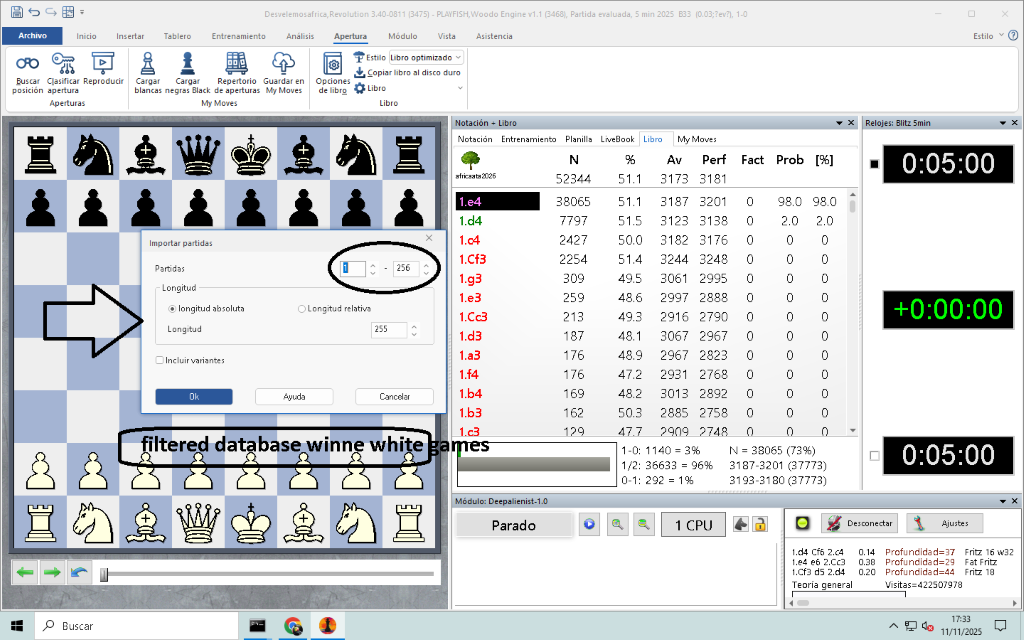
5.4 Configure the import length (critical!)
The Length section decides how deep your book lines will go. Fritz offers:
- Absolute length “n”
Every variation is imported to exactly n half-moves (plies), regardless of whether it is a main line or side line. Good for engine-only trees where you want very deep coverage of everything.(help.chessbase.com) - ECO-relative length “n”
Length is measured from the ECO classification point. Main lines (where the ECO key position appears late) become longer; side lines stay shorter. ChessBase recommends values around ECO-relative 20 as a practical balance between depth and size.(help.chessbase.com)
Recommended defaults:
- Wide, balanced engine book: ECO-relative 18–22.
- Highly specialised opening (e.g. just one variation): Absolute 30–40.
- Human study book: ECO-relative 16–20 so that sideline noise is limited.
5.5 Other options in the Import Games dialogue
Typical options you will see:
- Games: by default, “All games”. You can restrict to the first N games, but for most cases leave this at all.(talkchess.com)
- Include variations:
- Tick this if your source database contains deep analysis variations you want to preserve.
- These variations are imported into the tree, but usually not counted in statistical summaries.(help.chessbase.com)
When you are satisfied, click OK.
5.6 Watching the import and completion message
- A progress bar appears.
- After completion, Fritz shows a small message like “New positions: 20411” – this is the total number of positions inserted into your tree.(help.chessbase.com)
- Click OK.
You should now see a populated opening tree under the Openings Book tab (similar to the fourth image at the top).
6. Understanding the Fritz 20 book window
A typical book window shows, for the current position, a list of moves with statistics, like in the screenshot above. Column names can vary slightly, but commonly you see:
- Move – e.g.
e4,Nf3, etc. - N – number of games in which this move was played.
- % – score of the side to move (e.g. from White’s perspective).
- Av – average rating of players.
- Perf – performance rating achieved with that move.
- Fact – a reliability factor (based on sample size).
- Prob / Engine / % – probability that the engine will choose this move (derived from weights).(ecx.images-amazon.com)
Colours:
- Green move – “Tournament move”: preferred moves that are allowed in tournament book mode.(Scribd)
- Red move – “Don’t play in tournament”: moves the engine will never choose in tournament mode.(Scribd)
- Black / grey move – neutral: can be played in casual mode, but not specially promoted.
You interact with moves primarily via right-click context menus.
7. Connecting your CTG book to a chess engine in Fritz 20
To actually use the book with a UCI engine:
7.1 Create or select an engine
- Open Engine → Create UCI Engine… if your engine is not installed yet.
- Configure hash, threads, etc., then confirm.
7.2 Attach the book to the engine
- Start a New Game or Engine vs Engine session.
- In the new-game dialogue, look for Book / Openings Book:
- Choose your CTG file
Sicilian_Special.ctg.
- Choose your CTG file
- Click Book Options (or right-click in the book window and choose Book Options):
- Use book – enabled.
- Tournament book – if you want the engine to obey green/red flags strictly.
- Book learning – enable if you want the book to update from results automatically.(ecx.images-amazon.com)
Now when you start the game, the engine will follow your CTG lines until they run out, then switch to normal search.
8. Manually editing and tuning the CTG book
Creating the tree from games is only the first step. Strong engine books are heavily tuned. A classic TalkChess guide outlines the basic workflow: import games, then repeatedly edit and improve the book over time.(talkchess.com)
8.1 Adding new moves and lines
- Open the relevant game (or position) on the board.
- Make sure your book
Sicilian_Special.ctgis loaded. - Right-click inside the Openings Book window and enable “Allow move adding” (the exact wording may vary).
- Now, whenever you play a move on the board that is not in the book yet, it is added to the tree at that node.(talkchess.com)
- When a new move appears, right-click it and, if it is important, mark it as Main move (green).
This is perfect for inserting engine analysis lines: let your engine analyse a critical position to depth 20+, then add its main continuation to the book.
8.2 Adjusting probability weights
Fritz uses internal weights to decide which move to play among all available book moves. These weights typically range from –125 to +125.(ecx.images-amazon.com)
To adjust them:
- Right-click a book move.
- Choose Change weight (or similar).
- Enter a value:
- +125 – “always play this move” (within book).
- 0 – neutral.
- –125 – “almost never play this move”.
You can sculpt the behaviour:
- Give main theoretical moves high positive weights.
- Give experimental sidelines low positive or even negative weights.
- Completely “switch off” bad moves by making them red (see next subsection).
8.3 Marking main moves and forbidden moves
Right-click on a move in the book:
- Main move / Tournament move
- Marks the move green.
- In tournament-book mode, only green moves are considered.(Scribd)
- Don’t play in tournament
- Marks the move red.
- The engine will never play that move in tournament mode.
You often use these together: mark one or two best moves green, mark known bad moves red, and leave the rest neutral or low-weight.
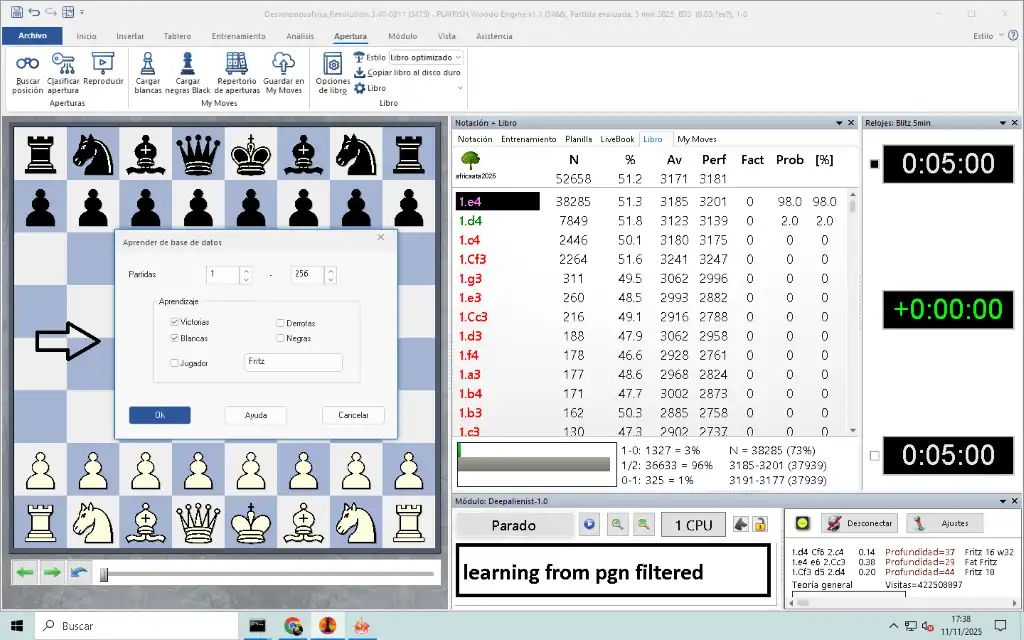
8.4 Learning from databases (automatic tuning)
Fritz can also learn from existing databases, adjusting weights based on game results, without re-importing all moves.(ecx.images-amazon.com)
- Load your CTG book.
- Go to Edit → Openings book → Learn from database….
- Choose a source database (e.g. your recent engine tournament).
- Set learning parameters:
- Use Wins, Losses, White, Black, or Player filters to control how results affect weights.
- Confirm and let Fritz process the games.
This essentially tells Fritz: “Pretend these games were played with this book and adjust the probabilities accordingly.”
8.5 Continuous repair and upgrade loop
A practical long-term loop (very popular among engine testers):(talkchess.com)
- Run engine tournaments using your book.
- Inspect lost or badly drawn games.
- At the first critical position where the engine falls out of book with a bad eval:
- Let a strong engine analyse deeply.
- Add the better line to the CTG and mark it green.
- Mark the old, inferior line red or low-weight.
- Periodically run Learn from database to reinforce successful lines.
“A book is never finished; it is a permanent project under construction.”
9. Using your CTG book in engine tournaments
Once your book is roughly tuned, you can integrate it into systematic testing:
- In Fritz’s Engine Match or Engine Tournament dialogs, always select your CTG as the book for each engine.
- For fair comparisons, either:
- Use the same CTG book for all engines, or
- Give each engine its own tailored CTG, but then document this in your results.
Remember that with very large books (millions of positions) there can be noticeable load times and memory usage; ChessBase help suggests that loading very large databases or book-like databases can become slow above a few thousand games, depending on hardware.(help.chessbase.com)
10. Example workflows
10.1 Creating a general engine-tournament book
Goal: a robust, neutral opening book for engine vs engine tournaments.
- Source database:
- Merge strong engine games plus top-level human games.
- Clean:
- Remove games <10 moves, low-rated players, strange variants.
- Import settings:
- ECO-relative length 20, include variations off.
- First tuning pass:
- Mark obvious blunders red.
- Slightly increase weights of main theoretical moves.
- Tournament cycle:
- Run 10k+ engine games.
- Use “Learn from database” with Wins/Losses enabled.
- Manually repair bad lines at critical points.
10.2 Building a narrow White repertoire book (e.g. 1.e4 only)
Goal: a training book for your personal White repertoire.
- Filter database for games where the player with White uses your intended repertoire (e.g. 1.e4 with specific favourite variations).
- Create a new CTG named
My_White_Repertoire.ctg. - Import with:
- ECO-relative 16–18 to keep sidelines short.
- Include variations on (if you want annotated analysis).
- Edit manually:
- For each branching point, choose one main move and mark it green.
- Turn inferior moves red so the engine never plays them in your drills.
- Training:
- Load the book as White’s repertoire.
- Use Fritz’s training features (“Train against the book”, opening drill, etc.) to memorise lines.(en.chessbase.com)
11. Maintenance, versioning and backups
Some practical best practices for serious book work:
- Version your CTG files
- Keep dated backups:
Sicilian_Special_v01.ctg,v02, etc. - After major tournaments or learning passes, increment the version.
- Keep dated backups:
- Limit size
- Huge books (hundreds of MB) can be slow to load and manage; competitive book contests often recommend keeping compressed size under a few hundred MB.(Google Sites)
- Export/convert for safety
- Tools exist (such as
ctgexporter) to convert CTG to other formats for backup and analysis.(chessprogramming.org)
- Tools exist (such as
- Document import settings
- Keep a simple text file next to the book where you record:
- source databases used,
- filters (ECO ranges, rating limits),
- import length and options,
- learning passes applied.
- Keep a simple text file next to the book where you record:
This makes your book work reproducible and helps if you later want to rebuild or compare versions.
12. Short FAQ
Q1. Can I build a CTG book directly from PGN without converting to CBH first?
Yes. In the Import Games dialogue, simply pick the PGN file as the source database; Fritz will handle it.
Q2. My engine is not playing book moves in the opening. Why?
Check that:
- The correct CTG is loaded and selected in Book Options.
- Use book and/or Tournament book are enabled.
- The current position is actually inside your book’s tree; if you start from a custom position outside your imported lines, there may be no book moves.
Q3. How much depth is “enough”?
For practical engine tournaments, ECO-relative 18–22 is a widely used compromise: deep enough for main lines, not too bloated in sidelines. Fine-tune depending on your database size and hardware.(help.chessbase.com)
13. Conclusion
Creating a CTG opening book in Fritz 20 is a repeatable, data-driven process:
- Prepare a clean, purpose-built database.
- Create an empty CTG book.
- Import games with well-chosen length settings.
- Understand and read the book statistics.
- Attach the book to your engines.
- Continuously tune and maintain it via manual editing and learning.
Once you master this workflow, your CTG books become powerful tools—for objective engine testing, for sharpening your own repertoire, and for building long-term opening projects that evolve with modern theory.

Jorge Ruiz
Filólogo y amante de la antropología social africana